LinkedIn Ads generate clicks but no leads for most B2B businesses because the targeting, offer, or lead form is misaligned with LinkedIn’s professional audience — not because LinkedIn doesn’t work for lead generation. LinkedIn has the highest cost-per-lead of any major ad platform, but when targeted correctly, it also produces the highest percentage of Marketing Qualified Leads (MQLs) and Sales Qualified Leads (SQLs). The key is matching your offer to the decision-making context of a professional on LinkedIn: they’re at work, they’re busy, and they need a clear business reason to give up their contact information.
[Case Study: B2B SaaS, $90K Monthly Program] A B2B SaaS company spending $90K/month on LinkedIn and Google Ads used last-click attribution, which heavily credited LinkedIn’s bottom-funnel content. Bayesian MMM identified LinkedIn’s role as primarily awareness — it was influencing Google searches that last-click then credited to Google. After separating the channels by funnel stage and reallocating 25% of LinkedIn budget to upper-funnel Google targeting, demo requests increased 28% while cost-per-demo dropped from $340 to $218. The model showed LinkedIn’s actual contribution was 2.4× what last-click reported.
According to LinkedIn’s own data, lead form completion rates on LinkedIn average 2–3x higher than on equivalent Google Display campaigns for B2B offers. The platform works — the issue is almost always in the execution. Here’s how to diagnose what’s going wrong.
Why LinkedIn Ads Generate No Leads: 5 Diagnosis Points
Diagnosis 1: Targeting the Wrong Job Titles
LinkedIn’s targeting power is its job title layer — but “Marketing Manager” means different things at a 5-person startup versus a 5,000-person enterprise. If you’re targeting “Marketing Manager” broadly, your ad reaches both the individual contributor doing hands-on campaign execution and the VP making budget decisions. These two people have different needs, different pain points, and respond to different offers.
Common targeting mistakes:
- Targeting too many seniority levels in one campaign. C-suite, VP, Director, and Manager have different priorities. A campaign targeting all four will produce leads that sales can’t qualify.
- Matching job titles to your existing customer list instead of ideal customer profile. Your best customers may be VP of Marketing at 200-person companies, but if you’re targeting “Marketing Manager,” you’re reaching a different buyer.
- Using LinkedIn’s suggested job titles without customization. LinkedIn suggests broad titles like “Marketing Manager” and “Sales Director” that cast too wide a net.
How to fix it: Define your ICP precisely — not just job title, but company size (employee count), industry, and seniority. Use LinkedIn’s Matched Audiences to target people who match your existing customer list, then layer in lookalike audiences based on your best leads. For a $50K+ deal size, target C-suite and VP-level only.
Diagnosis 2: The Offer Doesn’t Justify Sharing Work Contact Info
LinkedIn users are protective of their professional identity. Asking for a demo on a cold LinkedIn ad is a high-commitment ask that requires significant trust. If your landing page asks for a 30-minute call without a compelling low-commitment entry point, most people will click away.
Low-commitment offers that work on LinkedIn:
- Free templates (assessment templates, budget planning templates, ROI calculators)
- Industry benchmark reports with proprietary data
- Free trial or sandbox access to your software
- Webinar or workshop registrations (live events feel more exclusive than on-demand content)
High-commitment asks that fail on cold LinkedIn traffic:
- “Book a demo” (too much commitment for a cold stranger)
- “Get a custom proposal” (requires too much information upfront)
- “Talk to sales” (no value exchange)
How to fix it: Create a dedicated lead magnet for LinkedIn cold traffic. Something that delivers immediate value (a downloadable tool, a report they can use today) in exchange for their contact information. Save the “book a demo” ask for retargeting or nurture sequences.
Diagnosis 3: LinkedIn Lead Gen Form vs. Landing Page Mismatch
LinkedIn offers two ways to capture leads: Lead Gen Forms (which auto-populate with the user’s LinkedIn profile data) and website lead forms (which go to your own landing page). Each has different conversion dynamics.
Lead Gen Forms have 2–3x higher completion rates because they pre-fill fields — but they land in LinkedIn’s Lead Gen Manager, not your CRM directly, and require a CRM integration to flow into your sales pipeline.
Website forms give you more control over the experience but require the user to manually enter information, which drops completion rates significantly.
How to fix it: If your LinkedIn Lead Gen Forms are generating clicks but leads aren’t appearing in your CRM, the integration is broken. LinkedIn Lead Gen Forms require a CRM connection (via Zapier, HubSpot, or Salesforce connector) to automatically flow into your pipeline. If you’re not using one, your leads are sitting in LinkedIn’s Lead Gen Manager unreached.
Diagnosis 4: Not Using Retargeting to Warm Up Cold Traffic
Cold LinkedIn traffic — people who’ve never interacted with your brand — converts at rates too low to make most campaigns profitable, especially for higher-ticket B2B offers. The secret to profitable LinkedIn lead generation is retargeting warm audiences.
The standard LinkedIn funnel:
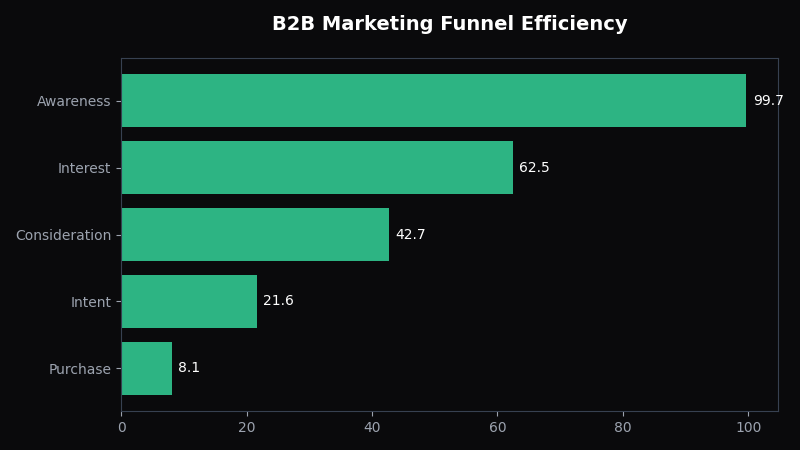
- Cold traffic: Awareness campaigns (video views, content views) targeting ICP job titles → build an audience
- Warm traffic: Retarget video viewers and page visitors with Lead Gen Forms → lower-friction conversion
- Hot traffic: Retarget website visitors and engagement audiences with “book a demo” offers → direct SQL generation
How to fix it: Install LinkedIn Insight Tag on your website to enable website retargeting. Create a sequential ad strategy where cold campaigns build audiences, then warm campaigns convert those audiences with lower-friction offers. Budget 70% of spend on retargeting and 30% on cold acquisition to maintain audience growth without burning budget on cold leads who aren’t ready.
Diagnosis 5: Attribution Blindness — LinkedIn Gets Credit But Another Channel Closes
Because LinkedIn has the highest CPL of any major ad platform, most marketers assume it must be generating the best leads. But last-touch attribution on LinkedIn is notoriously unreliable for closed-won deals.
In a typical B2B buyer journey, a prospect might first discover your brand through a LinkedIn post, be retargeted by a Google Display ad, search your brand name on Google, and then fill out a form from a LinkedIn sponsored InMail. Last-touch credits only the sponsored InMail — making LinkedIn look like it generated the lead when it actually just got the last click before the form fill.
“In B2B with 6+ month sales cycles, last-touch attribution systematically overcredits the awareness channel that closed the deal — and undercredits the research channels that built the conviction to buy.” — McKinsey B2B Sales Analytics, 2023
What to do instead: Use cross-channel attribution to see the full path. OptiMix’s Bayesian ADVI reveals LinkedIn’s true assisted-lead contribution across the full funnel — not just the leads it directly closes, but the role it plays in building awareness that other channels then convert. For B2B, LinkedIn’s role is often 2–3x what last-touch shows.
Quick Diagnostic Checklist
- Are your job title targets precise (specific title, company size, seniority level)?
- Does your offer justify sharing professional contact information?
- Are your Lead Gen Form leads flowing into your CRM automatically?
- Are you running retargeting campaigns for warm audiences?
- Is your LinkedIn CPL justified by closed-won revenue, not just form fills?
Frequently Asked Questions
Q: Is LinkedIn advertising worth it for small business?
A: LinkedIn advertising can work for small B2B businesses selling products or services with deal sizes above $10K — where the higher lead quality justifies the higher CPL ($50–$300+ per lead on LinkedIn vs. $10–$50 on Google). For SMBs selling below that threshold, LinkedIn’s cost structure is difficult to make profitable. The key is precise ICP targeting and using Lead Gen Forms with low-friction offers (templates, assessments) to improve conversion rates before asking for demos.
Q: How do I generate leads with LinkedIn Ads?
A: Generate leads with LinkedIn Ads by first defining your ICP precisely (job title + company size + industry), then creating a low-friction offer (template, report, assessment) as your lead magnet. Use LinkedIn Lead Gen Forms to capture pre-filled leads, set up a CRM integration to flow those leads automatically, and run a retargeting funnel — cold campaigns to build audiences, warm retargeting to convert. Budget 70% to retargeting, 30% to cold acquisition for sustainable lead flow.
Q: What is a good LinkedIn Ads cost per lead?
A: A good LinkedIn Ads cost per lead depends on your industry and deal size. B2B SaaS averages $50–$150 per lead; professional services (law, consulting) averages $100–$300 per lead; enterprise software can exceed $500 per lead. However, raw CPL only matters relative to lead quality. A $200 CPL that produces 40% MQLs and 15% SQLs is far more valuable than a $30 CPL producing 5% MQLs and 1% SQLs.
Q: How do I optimize LinkedIn Lead Gen Forms?
A: Optimize LinkedIn Lead Gen Forms by using the minimum fields necessary (name + email is often enough for cold traffic), using the “pre-fill with LinkedIn” option to auto-populate fields and reduce friction, and matching your form’s headline to the creative ad headline exactly. For higher-intent warm audiences, you can add qualifying questions (company size, job seniority) — but keep the total field count under 7 to maintain completion rates above 50%.
Further Reading & Sources
- arXiv — open-access research papers and preprints
- Deloitte — professional services and consulting
- Harvard Business Review — business management research
- McKinsey & Company — global management consulting
- Statista — statistics and market data
Owner’s Note
The practical question is whether LinkedIn is producing pipeline quality that justifies its higher cost. Before changing the budget, compare the article’s framework with your own last 30 to 90 days of spend, revenue, and qualified outcomes. The best next move should be small enough to test, clear enough to measure, and tied to profit rather than platform-reported activity.
Leave a Reply